Eureka! This site needs help too.
Edureka: What They Do and Who They're Trying to Reach
Edureka is an online learning platform in the crowded EdTech space, but they position themselves differently than the "cheap and fast" course marketplaces (like Udemy).
Their unique selling proposition is "ridiculous commitment." They aren't just selling access to videos; they are selling completion.
Their core offering is instructor-led, structured courses with 24/7 support and constant reminders to ensure students actually finish what they start.
Their target audience consists of professionals looking to upskill in high-tech fields (Data Science, DevOps, Cloud Computing) and students who need that extra layer of accountability to achieve their career goals.
First Impressions: Does the Site Communicate Clearly?
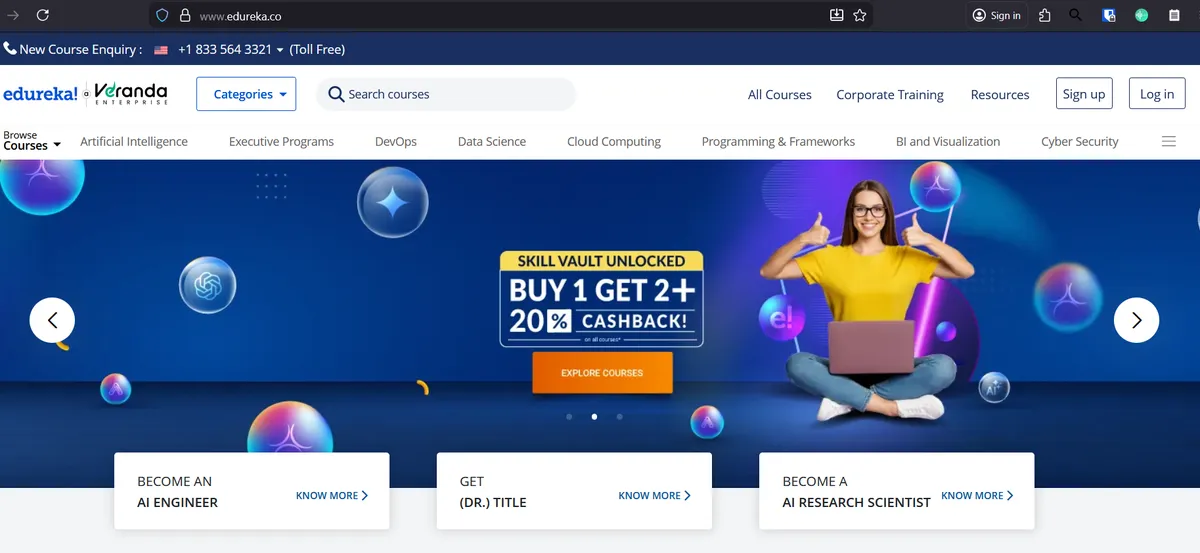
Visually, the site is loud, but it assumes the user is already "warm."
The "Sales First" Approach: The hero section is dominated by a transactional offer ("BUY 1 GET 2 + 20% CASHBACK"). While this is great for closing a sale, it does little to educate a new visitor on why they should choose Edureka.
The site skips the "education" phase and jumps straight to the "conversion" phase.
Navigation Saves the Day: While the main banner is purely promotional, the top navigation bar is excellent. It immediately categorizes their offerings (AI, DevOps, Big Data), helping a user orient themselves quickly.
The Missing "Why": The "About Us" text speaks passionately about their "ridiculous commitment" to students, but this message is buried.
On the homepage, a user sees a discount code, not the promise of a support team that will "make sure you run out of excuses."
Their Content Strategy: What Are They Publishing?
To put it bluntly: The content strategy is currently dormant.
Recency Issues: The "Advanced MS Excel" section claims to have 3 blogs, but only one is visible. The publication date is March 4, 2024.
In the world of digital content, a blog that hasn't been updated in over a year tells users (and Google) that the lights are off.
High Friction: The user experience for the blog is counter-intuitive. Instead of showing a feed of helpful articles, the user is forced to "select a topic" from a grid of tiles before they can see any content.
This acts as a barrier, hiding their content rather than showcasing it.
Feature-Focused vs. Problem-Focused: The single post available, "Mastering Excel Formulas," is a classic example of feature-focused content. It lists 20 formulas (SUM, AVERAGE, IF) and defines them.
It reads like a textbook manual ("Here is what this tool does") rather than a helpful guide ("Here is how to solve your specific problem").
Questions Their Audience Is Actually Asking
We analyzed the search data for their Excel audience, and there is a massive gap between what Edureka is publishing (Formulas) and what the audience is actually typing into Google (Efficiency).
Here are the opportunities they are missing:
1. The "F-Keys" Mystery (High Volume) Users are confused about the function keys. They are specifically asking: What is F1, F2, F3... in Excel? What do F2 and F9 do?
- The Gap: Edureka’s current post doesn’t mention function keys once. There is an easy opportunity to write "The Ultimate Guide to F1-F12 in Excel."
2. The "Speed Demon" Intent (Shortcuts) The audience wants to work faster. They are asking: What is Ctrl+T? What is Ctrl+Shift+L? What are the 20 shortcut keys?
- The Gap: The audience is looking for cheatsheets and speed hacks. Edureka is giving them long definitions of the
SUM()function.
3. Specific Automation (Numbering) A distinct cluster of questions revolves around simple automation: How to automatically number 1 to 100? Formula for 1 to 100?
- The Gap: This is a specific "How-To" problem that takes 30 seconds to solve, but Edureka has no content addressing it.
Content Strategy Score: 1/5
Verdict: Content is primarily about features, is outdated, and ignores user intent.
The site is functioning purely as a sales funnel for people who are already ready to buy. It is not functioning as a resource to attract new people.
Immediate Steps for Improvement:
- Publish "The Efficiency Guide": Stop writing about basic formulas (which are saturated) and write a post titled "20 Excel Shortcuts That Will Save You an Hour Every Day" covering the Ctrl+ and F-Key questions.
- Remove the UX Wall: Redesign the blog so users see recent articles immediately, rather than having to click a category tile first.
- Update or Archive: A blog post from early 2024 looks abandoned. Either update the "Mastering Excel" post to include the missing shortcuts or publish a fresh piece immediately to show the site is alive.